

How to Create a Social Media Calendar That Actually Works
Struggling to stay consistent with your social media posts? You’re not alone.
One of the biggest challenges brands face is showing up regularly on social media without burning out or running out of content. That’s where a social media calendar comes in.
A well-planned calendar keeps your content organized, aligns your posts with business goals, and saves you a ton of time and stress.
In this post, you’ll learn how to create a social media calendar that not only keeps you consistent but actually works to grow your audience and drive engagement.
✅ What Is a Social Media Calendar?
A social media calendar is a tool that helps you plan, organize, and schedule your content across various platforms in advance.
It can be as simple as a spreadsheet or as advanced as using tools like:
-
Google Sheets or Excel
-
Trello or Notion
-
Later, Buffer, Hootsuite, or Sprout Social
🎯 Why You Need One
-
Stay consistent (the #1 rule for growth)
-
Avoid last-minute posting panic
-
Maintain a healthy content mix (promotional, educational, entertaining)
-
Align posts with campaigns, launches, and holidays
-
Save time by batching content creation
🧠 Step 1: Set Clear Goals
Start with the big picture. Ask:
-
What do I want to achieve with my social media?
→ Examples: More brand awareness, drive website traffic, grow email list, increase sales -
Who is my target audience?
→ What platforms do they use? What content do they engage with?
Your goals will shape the type of content you create and how often you post.
📅 Step 2: Decide How Often You’ll Post
You don’t need to post every day on every platform. Choose a realistic frequency for your schedule.
Here’s a simple example for beginners:
| Platform | Frequency |
|---|---|
| 3x per week | |
| 2–3x per week | |
| 2x per week | |
| Twitter/X | 1–2x per day |
| TikTok | 2x per week |
Start small. It’s better to be consistent with less than to overcommit and quit.
🧩 Step 3: Choose Your Content Pillars
Content pillars are themes or categories you’ll post about regularly.
Examples:
-
💡 Educational (tips, how-tos, industry insights)
-
🎉 Entertaining (memes, trends, behind the scenes)
-
👥 Community (user-generated content, testimonials)
-
🛍️ Promotional (products, services, sales, launches)
-
🗣️ Engagement (polls, questions, challenges)
Choose 3–5 core pillars that align with your brand and rotate them throughout the week.
✍️ Step 4: Plan Your Content in Batches
Pick one day a week or month to plan ahead.
What to plan:
-
Post topic or title
-
Platform
-
Post copy
-
Image or video asset
-
Hashtags
-
Call-to-action
-
Schedule or publish date
📌 Pro Tip: Use tools like Canva to design graphics, and ChatGPT (like me!) to draft captions faster.
📆 Step 5: Use a Simple Template
You can build your calendar in Google Sheets, Airtable, or Trello. Here’s a basic layout:
| Date | Platform | Content Pillar | Topic/Title | Caption | Image/Link | Status |
|---|---|---|---|---|---|---|
| June 21 | Tips | 5 Canva Hacks | [Caption] | [Image] | Scheduled |
🔁 Step 6: Schedule (or Auto-Schedule) Posts
Use scheduling tools to save even more time:
-
Meta Business Suite (for Facebook and Instagram)
-
Buffer
-
Later
-
Planoly
-
Hootsuite
These platforms let you schedule your posts in advance, preview your feed, and even repost top-performing content.
📊 Step 7: Track What’s Working
A calendar is a living document—track what performs well and update your strategy accordingly.
Monitor:
-
Engagement (likes, comments, shares)
-
Follower growth
-
Click-through rates (CTR)
-
Website traffic (via UTM links and Google Analytics)
Use this data to double down on what works and improve future content.
💡 Bonus Tips
-
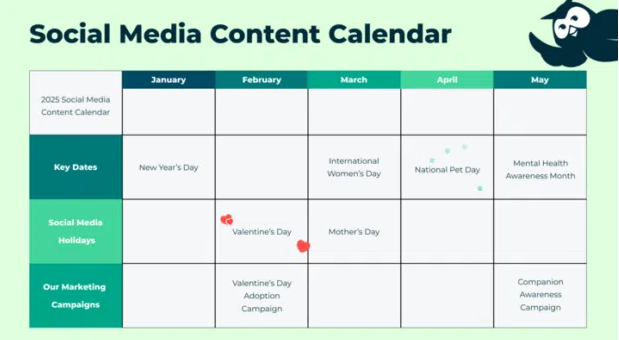
Include important dates: holidays, product launches, events, awareness days
-
Use content buckets: Group similar posts and rotate them (e.g., every Tuesday = tip day)
-
Repurpose blog content: Turn one post into quotes, carousels, or reels
-
Leave room for trends: Plan 80%, but keep 20% flexible for reactive content
✅ Final Thoughts
Creating a social media calendar that actually works isn’t about making things look pretty—it’s about planning with purpose.
With the right strategy, tools, and consistency, you’ll save time, post with confidence, and build a social presence that drives real results for your brand.


