
How to Repurpose Blog Posts Into Social Media and Email Content
Creating high-quality blog content takes time and effort, so why only use it once?
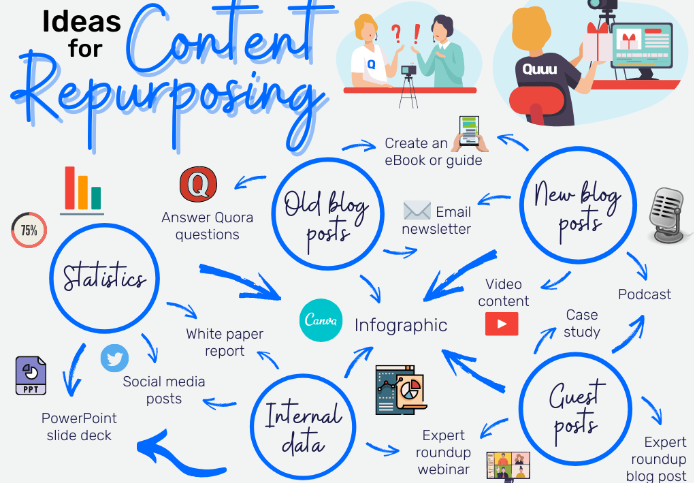
Smart marketers know how to repurpose a single blog post into multiple pieces of content, giving it new life across different platforms like social media and email. This not only saves time but also helps you reach wider audiences in the formats they prefer.
In this guide, we’ll show you exactly how to transform a single blog post into engaging social media content, newsletters, and even lead magnets.
✅ Why Repurpose Your Blog Content?
-
Save time and effort by working smarter, not harder
-
Reach new audiences on different platforms
-
Boost SEO and visibility with more content linking back to your site
-
Reinforce key messages with consistent communication
-
Fill your content calendar with minimal extra work
🔁 1. Break It Into Bite-Sized Social Media Posts
Blog posts are usually long-form and in-depth. But social media thrives on short, engaging, and visual content. Here’s how to make the shift:
💡 Turn key takeaways into:
-
Instagram carousels or quote graphics
-
LinkedIn mini-articles or tips threads
-
Twitter/X threads that break down your blog step-by-step
-
Facebook or Instagram Reels where you talk about one main point
-
Pinterest pins linking back to your blog
Example:
Your blog post is: “10 Ways to Improve Website Speed”
You can create:
-
A LinkedIn post: “Top 3 Mistakes Slowing Down Your Website”
-
An Instagram carousel: “10 Quick Fixes to Speed Up Your Site”
-
A short video explaining just one of the points
📌 Pro Tip: End every social media post with a call-to-action to “Read the full blog” with a link.
📧 2. Turn the Post Into an Email Newsletter
Email subscribers are already warm leads. Give them value by repackaging blog content directly in their inbox.
How to do it:
-
Summarize the blog post in a few paragraphs
-
Include bullet-point highlights or a “What You’ll Learn” section
-
Link back to the full post for more details
-
Add a personal insight or quick takeaway to build rapport
Subject line examples:
-
“Struggling With Site Traffic? These 5 Tips Can Help”
-
“Here’s How to Speed Up Your Website in Under 10 Minutes”
📌 Pro Tip: If the blog post is long, consider turning it into a 2–3-part email series.
🎥 3. Create Video or Audio Content
Take your blog’s main points and turn them into:
-
YouTube videos or Shorts
-
TikToks
-
Instagram Reels or Lives
-
Podcast episodes
-
LinkedIn videos
Example: Turn a blog titled “How to Write Better Headlines” into:
-
A 60-second tip video: “3 Hacks for Headlines That Convert”
-
A podcast: “What Makes a Headline Go Viral?”
🧲 4. Use It as a Lead Magnet or Downloadable
A well-researched blog post can be repackaged into:
-
A PDF checklist, worksheet, or guide
-
A mini eBook combining several related blog posts
-
A free email course broken into bite-sized lessons
Example:
Your blog post: “The Beginner’s Guide to SEO”
Turn it into:
-
“Free SEO Starter Checklist”
-
“3-Day SEO Crash Course” via email
📌 Pro Tip: Use tools like Canva to design attractive downloads quickly.
🔗 5. Link It in Social Bios, Stories, and Highlights
Once you’ve repurposed your blog content, don’t forget to promote it regularly:
-
Add blog links in your Instagram bio or Linktree
-
Share it in your Instagram and Facebook Stories
-
Pin it to your Twitter/X profile
-
Highlight it in your LinkedIn Featured section
📆 6. Schedule and Reuse Over Time
Most blog content is evergreen—meaning it stays relevant for months or years. So don’t be shy about resharing!
Use tools like:
-
Buffer
-
Later
-
Hootsuite
-
SocialBee
Schedule snippets, graphics, and quotes from older blog posts on a recurring basis. Just tweak the format or caption slightly each time.
✨ Final Thoughts
One blog post can become 10+ valuable pieces of content if you know how to repurpose it creatively. By extending its reach across email and social media, you get more eyes, more engagement, and more conversions—without creating everything from scratch.


