

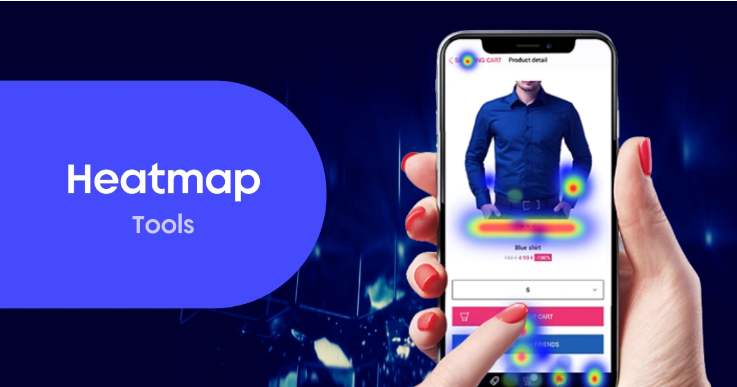
Heatmaps & Session Recordings: Best Tools for UX Insights
Understanding how users interact with your website isn’t just helpful, it’s essential. If you’re relying solely on traditional analytics to diagnose performance issues or UX friction, you’re missing a massive part of the story.
That’s where heatmaps and session recordings come in.
These tools offer real-world, visual insight into user behavior. They show where people click, how far they scroll, and where they drop off—all without the guesswork. Whether you’re trying to improve conversion rates, fix broken layouts, or validate design ideas, heatmaps and session replays are the UX secret weapon you should be using.
In this post, we’ll break down what heatmaps and session recordings are, when to use them, and which tools are best in 2025.
🔍 What Are Heatmaps?
Heatmaps are visual overlays that highlight user interactions on a web page. They use color intensity to show:
-
Clicks (where users tap or click)
-
Scroll depth (how far down they go)
-
Mouse movement (which areas they hover over)
Think of heatmaps as a thermal snapshot of what’s getting attention—and what’s being ignored.
🎥 What Are Session Recordings?
Session recordings (also known as session replays) let you watch a user’s journey on your website like a screen recording. You can see:
-
Cursor movement
-
Clicks and scrolls
-
Page navigation
-
Form interactions
-
Rage clicks or hesitation
These videos are powerful for understanding behavior on a granular level—especially when something isn’t working as expected.
🧠 Why Use Heatmaps & Session Recordings?
Here’s what these tools help you uncover:
-
UX bottlenecks: Where users get stuck or confused
-
Form abandonment issues: Where users stop filling out forms
-
CTA effectiveness: Are people seeing and clicking your buttons?
-
Design flaws: Unclickable elements that look clickable
-
Mobile vs desktop behavior: See how layouts perform across devices
-
Conversion optimization opportunities: Discover where users are dropping off
In short: if Google Analytics tells you what is happening, heatmaps and session recordings show you why.
🛠 Best Heatmap & Session Recording Tools in 2025
Here are the top platforms that offer these insights:
1. Hotjar
Best for: Small to medium businesses wanting UX clarity fast
Key features:
-
Click, move, and scroll heatmaps
-
Session recordings
-
Feedback polls and surveys
-
Funnels and user behavior dashboards
Why marketers love it:
Hotjar is intuitive, budget-friendly, and integrates easily with most CMS platforms. Perfect for spotting high-impact UX fixes.
2. Microsoft Clarity
Best for: Free, no-limits heatmaps and recordings
Key features:
-
Unlimited session recordings and heatmaps
-
Rage click and dead click tracking
-
Built-in insights dashboard
-
Integrates with GA4
Why it’s a game-changer:
Clarity is 100% free, making it ideal for startups or anyone dipping their toes into UX insights without spending a dime.
3. Crazy Egg
Best for: A/B testing + visual behavior tracking
Key features:
-
Heatmaps, confetti maps (by traffic source)
-
Scrollmaps and recordings
-
A/B testing tools built in
-
Simple setup and interface
Why it stands out:
Crazy Egg combines behavior data with testing tools so you can take action on what you learn right away.
4. FullStory
Best for: Product teams needing granular, developer-level insights
Key features:
-
Detailed session recordings with DOM capture
-
Heatmaps, click maps, and funnel analysis
-
Dev tools and error reporting
-
AI-driven insights and anomaly detection
Ideal for:
SaaS companies and teams with complex user journeys. FullStory is powerful, but comes with a steeper price and learning curve.
5. Smartlook
Best for: Web and mobile app analytics combined
Key features:
-
Session recordings and heatmaps
-
Event-based funnels
-
Mobile app tracking
-
Custom event tagging
Best for hybrid teams:
If you’re tracking both app and website UX, Smartlook offers a unified view with powerful segmentation.
🔄 When to Use These Tools
-
During a website redesign
Spot old pain points and validate your new UX. -
Before a product launch
Ensure your pages are intuitive and user-friendly. -
When conversions dip
Use recordings to uncover roadblocks in the funnel. -
After launching a new feature or landing page
See how users interact in real-time.
✅ Best Practices for Using UX Insights
-
Segment your recordings: Focus on users who bounced or didn’t convert.
-
Watch 10–20 sessions per segment: Look for patterns, not edge cases.
-
Combine with GA4 or other analytics: Use quantitative data to guide where you look qualitatively.
-
Test fixes quickly: Don’t just observe—optimize.
🚀 Final Thoughts
In today’s crowded digital world, the smallest UX issue can cost you big conversions. Heatmaps and session recordings give you clarity into real user behavior, so you can make smarter design and content decisions.
If you’re not already using one of these tools, you’re operating blind. It’s time to see your site the way your users do—and fix what’s broken before they bounce.


